
Every order to the right branch, automatically.
RoutiVox reads each new order's delivery address, assigns it to the branch that covers that area, tags it in Shopify, and emails the branch team instantly.
Free plan available · No theme changes · Set up in minutes
- No manual order sorting
- Branch tag on every routed order
- Instant email to the right team
- Every order logged
Set it up once. Every order finds its branch.
Four steps, no code, and nothing to change in your storefront.
Add your branches
Create a branch for each store, kitchen, or warehouse and the email address that should receive its orders.
Map delivery areas
List the neighborhoods, cities, or districts each branch covers, such as Business Bay or Downtown.
Orders arrive
When a customer checks out, RoutiVox reads the shipping address and finds the branch that covers it.
The branch gets to work
The order is tagged in Shopify and the branch receives an email with everything it needs to deliver.
Built for stores that deliver from more than one place
Florists, bakeries, restaurants, pharmacies, and retailers with several branches use RoutiVox to stop forwarding orders by hand.
Area and postal-code routing
Match orders to branches by neighborhood, city, state, country, or postal code, including prefixes like SW1* and ranges like 2000-2099.
Automatic branch tags
Every routed order gets a branch tag in Shopify, so you can filter, report, and fulfil by branch.
Instant branch emails
Each branch gets the items, totals, address with a Google Maps link, and customer note, plus copies for up to five teammates.
One-click fixes
Add a missing area from an unrouted order, reassign an order to another branch, or re-send the email, right from Order Logs.
Cancel and refund alerts
Branches are told immediately when an order they received is cancelled or refunded, so nothing is delivered by mistake.
Rules and scheduled reports
Add your own tagging rules and alerts, and email order reports on a schedule in your store's time zone.
Built for stores in any country
Addresses in any language, any currency, any time zone, and the way your country writes postal codes.
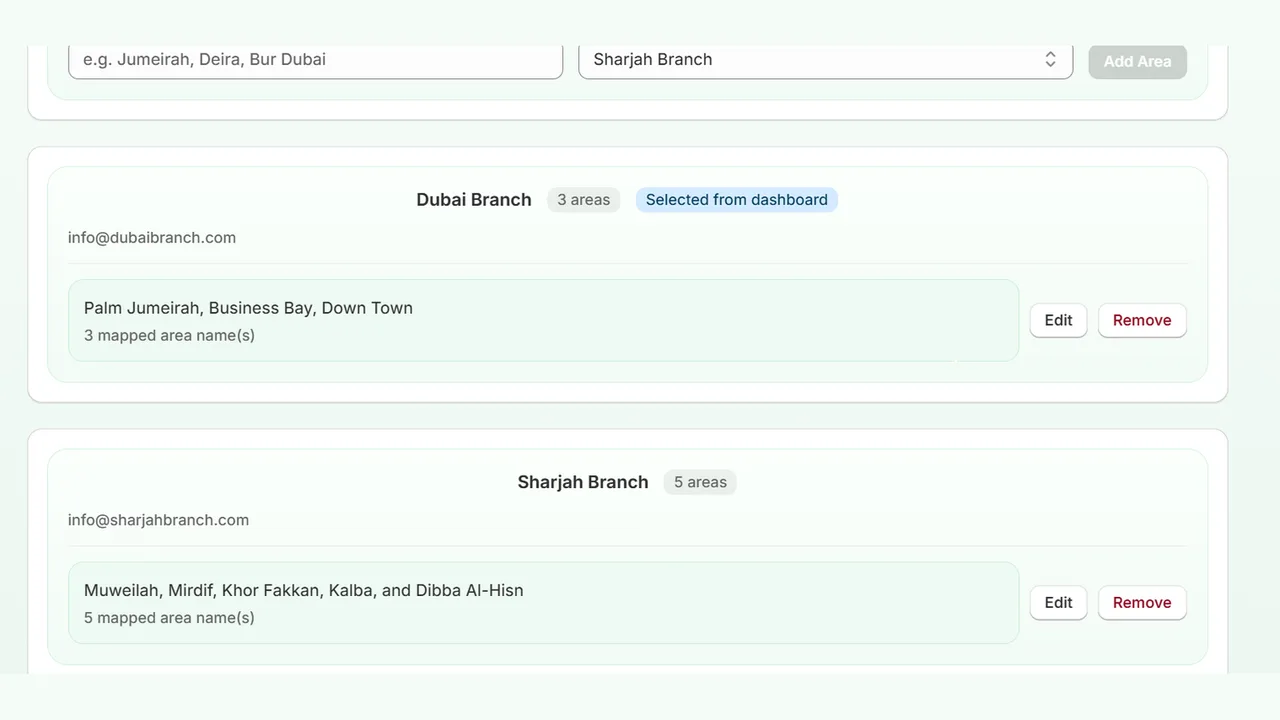
10001, prefixes SW1*, and ranges 2000-2099.California or CA.Your delivery map, in plain words
Assign neighborhoods and cities to each branch. Add several spellings at once, separated by commas.
- See every branch's coverage at a glance
- Inactive branches are skipped automatically
- The most specific area name wins
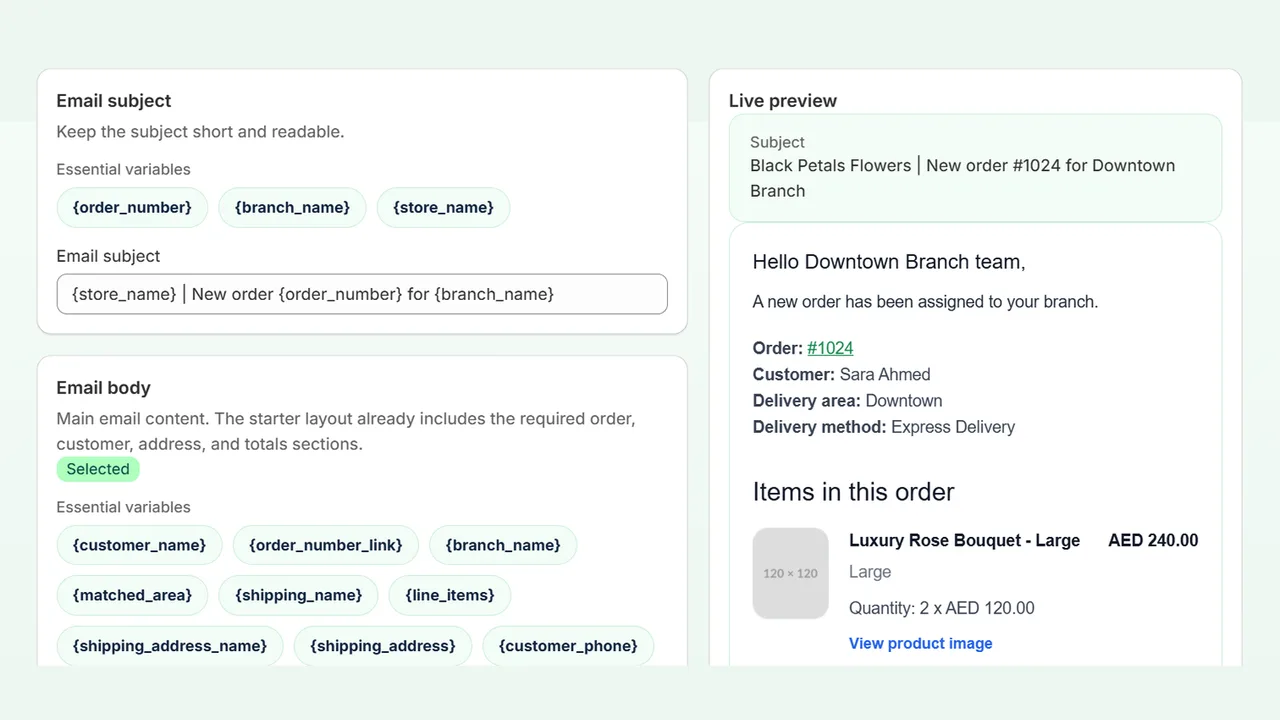
An order email your team can act on
Each branch receives the items, totals, delivery address, and customer note, with your branding.
- Choose which sections appear
- Write your own greeting and instructions
- Live preview before you save
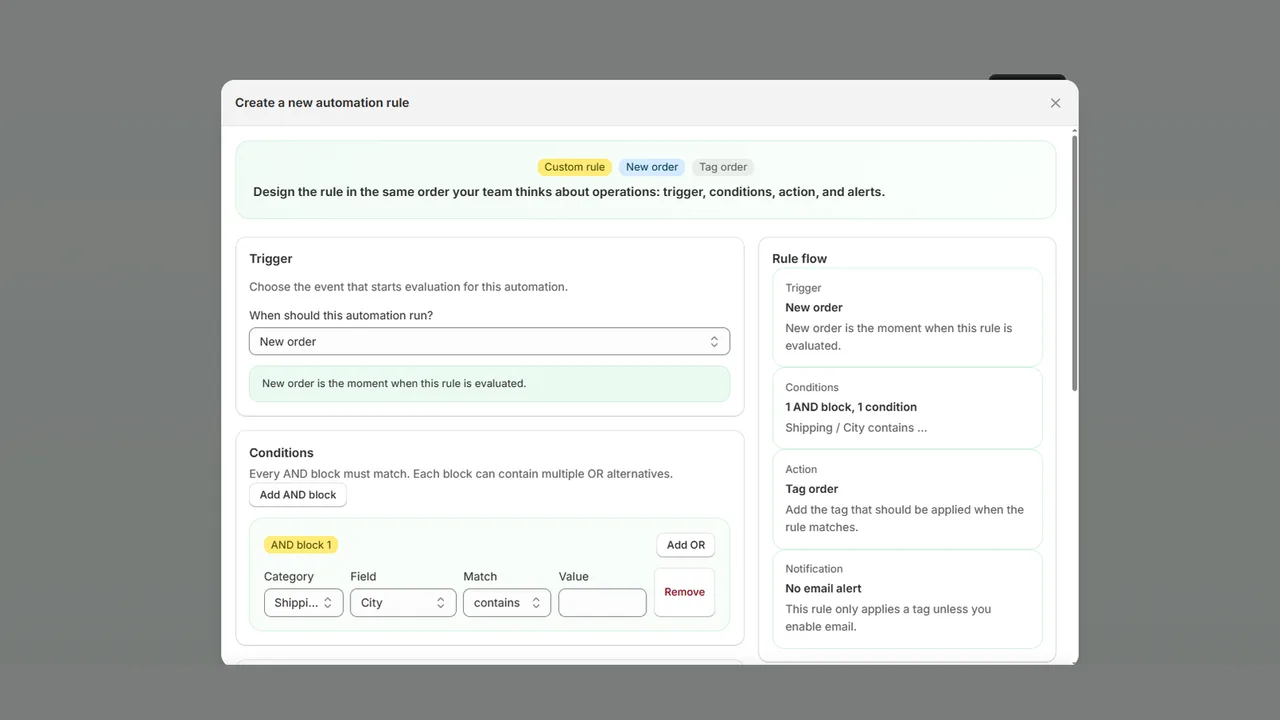
Extra rules when you need them
Tag VIP customers, flag high-value orders, or alert a manager, using conditions on the order, customer, products, or shipping.
- AND and OR conditions
- Order or customer tags
- Optional email alert per rule
Any Shopify store with more than one delivery point
Start free. Upgrade as you add branches.
Unlimited delivery areas and orders on every plan, with a 14-day free trial on paid plans.
Free
Try real routing with a small team.
- 2 branches
- Area-based routing and branch tags
- Instant branch emails with Maps link
Starter
For growing stores with a few branches.
- 5 branches
- Everything in Free
- Extra recipients per branch
Growth
For busy multi-branch operations.
- 15 branches
- Everything in Starter
- Unlimited custom rules
Scale
For large networks and franchises.
- Unlimited branches
- Everything in Growth
- HTML email editor
Only the data needed to deliver
RoutiVox is built around Shopify's protected customer data requirements.
Minimal data
Only the order fields needed to route and notify a branch are used.
Encrypted storage
Stored personal details and settings are encrypted, and connections use TLS.
Limited retention
Order logs are removed automatically after the retention period, or cleared by you anytime.
Privacy requests
Shopify customer data and redaction requests are handled automatically.
Questions merchants ask
How does RoutiVox decide which branch gets an order?
It compares the order's shipping address with the delivery areas you mapped to each branch: names, postal codes, prefixes, or ranges. Any language works; case, accents, and punctuation are ignored; and the most specific area wins if two match.
What happens if an order doesn't match any area?
It can go to a fallback branch you choose. Otherwise it appears in Order Logs as "Not routed", where you can add the missing area and route the order in one click.
Do I need to change my theme or checkout?
No. RoutiVox runs inside your Shopify admin and works from order data. Nothing is added to your storefront or checkout.
Who sends the branch emails?
Emails are sent from RoutiVox's verified address. You can set your store name as the sender name and a reply-to address, so branch replies come straight to you.
Can I customize the email?
Yes. The simple editor lets you choose sections, write the greeting and closing, and pick an accent color, with a live preview. An HTML editor is available for full control.
Is customer data safe?
RoutiVox only uses the order details needed to route and notify. Stored personal data is encrypted, order logs are kept for a limited period, and Shopify's privacy requests are honored automatically.
How much does it cost?
There's a free plan for up to 2 branches. Paid plans start at $9 per month, include a 14-day free trial, and are billed through Shopify. See the pricing page for details.
Stop forwarding orders by hand
Install RoutiVox, add your branches, and let every new order find its way to the right team.